
Innovation
– 10 min read
New at WRITER: More autonomy for agents, more control for admins

Think about the person on your team who’s always one step ahead. They know your 9am is about to start, so the prep doc is on your desk when you sit down. They draft the recap the moment your customer call wraps, not an hour later. They see your agency drop a new asset in the shared folder and get the brand review moving before anyone else has opened the file. They read the signals in your day — the calendar alerts, the call completions, the file uploads — and they act on them.
AI agents should work the same way. But most tools in the category still sit behind a text box, waiting for someone to walk up and describe the work. That’s fine for one-off requests. It’s a problem for the work that runs your team — the meetings that anchor your motion, the content that flows through your pipeline, and the calls that reset your account plans. That work doesn’t arrive as a prompt. It arrives as a calendar event, a completed call, and a new file in a folder.
This month, we’re releasing a host of new features that make WRITER more proactive, more autonomous, and more connected — all with the security and controls our customers need to operate agents in the enterprise. New Playbook triggers from Gong, Google Calendar, SharePoint, and Google Drive kick off workflows the moment something changes. New Connectors — Adobe Experience Manager and Google Drive — extend WRITER into the systems your content actually moves through. And a set of new admin capabilities — Connector Profiles, WRITER Agent Profiles, AI Studio Observability, a Datadog Logs plugin, and Bring-Your-Own Encryption Keys — gives IT the visibility and controls to scale it all safely.
Here’s what we shipped in April.
Workflows that start on their own
Playbooks only pay off when someone remembers to run them. The brilliant campaign brief Playbook your team built last quarter doesn’t help on the kickoff that no one thought to run it for.
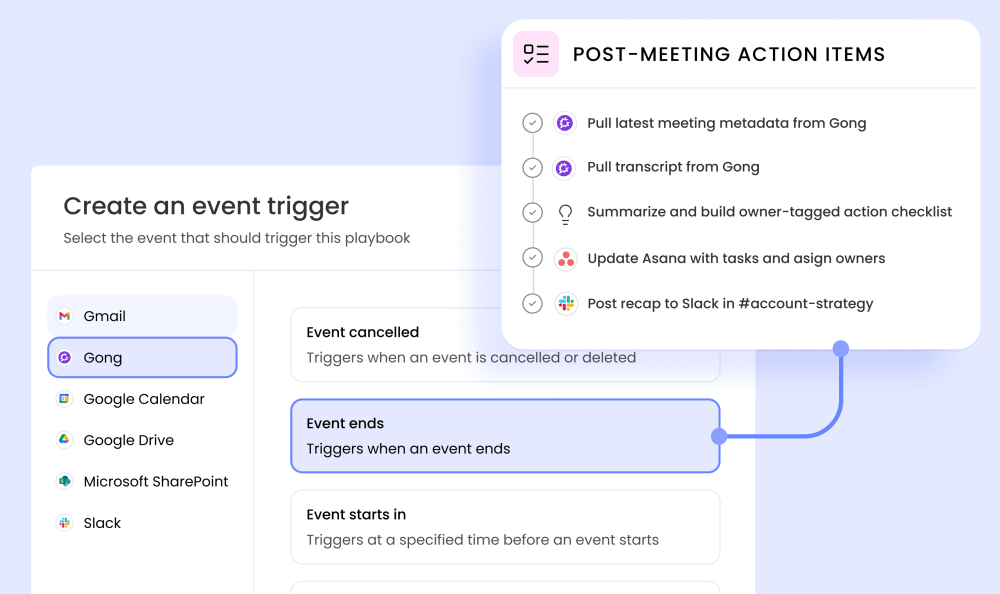
Four new triggers — Gong, Google Calendar, SharePoint, and Google Drive — let Playbooks fire automatically when the moments that anchor your work actually happen. They build on the Gmail, Slack, and webhook triggers we shipped earlier this year, rounding out the set of events your team’s work already revolves around.
Calendar triggers: prep before the meeting, recaps the moment it ends
Every meeting creates a halo of work around it. Briefs before, recaps after, CRM updates once the dust settles. Even when you’ve built Playbooks for all of it, someone has to remember to run them.
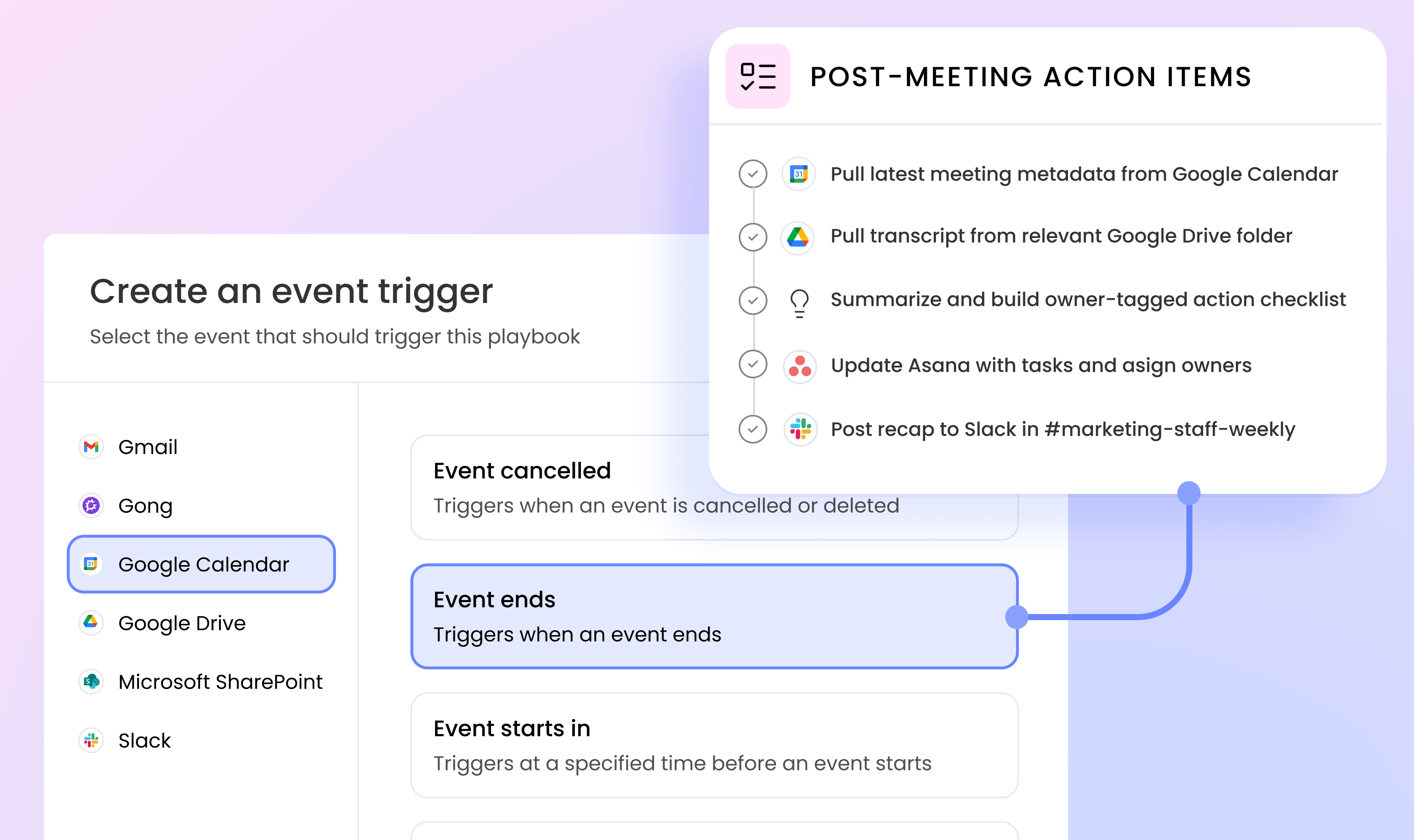
Google Calendar triggers tie Playbooks directly to your meetings. Four event types — New event, Event starts in, Event ends, Event cancelled — let you match the trigger to your unique use case. Attach an “Event starts in 30 minutes” trigger to your briefing Playbook, and half an hour before a customer call, WRITER pulls account history from HubSpot, pipeline status from Salesforce, and the last quarter of competitive intel into a polished prep doc — ready in your inbox before you’ve opened the meeting invite. After the call, an “Event ends” trigger drafts the recap, logs action items in Asana, and updates the account in HubSpot. A new webinar on the calendar spins up promo copy and landing page drafts.
Your calendar already knows your week. Now WRITER does too.
Gong triggers: call follow-up that runs itself
The richest context in a sales or CS org lives in conversations — and most of it evaporates within a day of the call. Between one call ending and the next starting, the window to act on the details of the discussion closes fast.
Gong triggers run the follow-up the second a call wraps. Attach a Call completed trigger to a recap Playbook, and every customer conversation produces the same reliable handoff — notes summarized, action items identified, CRM updated, competitive mentions flagged to product marketing, and at-risk signals routed to the CSM channel.
SharePoint and Drive triggers: when a file lands, the next step is already moving
Marketing work arrives in folders. Agency deliverables, research reports, transcripts, translated copy — they land in SharePoint or Google Drive and wait for someone to notice. Files sit unreviewed. Transcripts go unread.
SharePoint triggers (New file, New folder, New list, New list item) and Google Drive triggers (New file, New folder) close that gap. Playbooks fire the moment something drops into the folders that matter.
When your agency drops an asset into Drive, a brand-review Playbook checks it against your voice and style guide and posts what needs fixing to Slack. When a transcript lands, a research Playbook extracts insights, tags themes, and updates your customer insights knowledge base.
Agents that work in the systems your content lives in
An agent is only as valuable as the systems it can reach. A Playbook that drafts campaign content is useful. A Playbook that drafts it and publishes it directly into your DAM is a different category of tool.
Close the last mile of content publishing: Adobe Experience Manager
Marketing content has a journey: brief, draft, review, compliance check, asset pull, publish. Until now, WRITER handled the first four-fifths of that journey, and then dropped you into manual production work for the last mile.
The Adobe Experience Manager connector closes that gap. WRITER now has direct access to the AEM building blocks your team works in every day — pages, content fragments, assets, and Cloud Manager entities. A Playbook can create a page, update content fragments, and publish — without anyone copy-pasting output into AEM by hand.
For regulated industries, the win is bigger. Brand guidelines, legal review criteria, and channel-specific rules get baked into the Playbook that builds and publishes the asset — so compliance isn’t a separate stage at the end. It’s how the asset gets built from the start.
Google Drive, fully connected
Drive is where a lot of marketing work actually lives — research, agency drops, transcripts, translated content, creative reviews. We shipped Drive triggers above. Now WRITER also reads and writes into Drive as a first-class Connector. It’s the foundation that powers those triggers and opens up a broader set of workflows that treat Drive the way it already functions for your team — as the place content lives.
The controls IT needs to scale all of this safely
Automation that listens to your calendar and acts in your DAM is powerful. It’s also a bigger surface area than IT has experience governing. The more triggers and connectors a platform has, the more important it is that access, identity, visibility, and encryption all match the risk profile of the enterprise deploying it.
Scope connector access per team: Connector Profiles
Your marketing team has different CRM access than your sales team. Your RevOps group has SharePoint visibility that your wider org doesn’t. Until now, WRITER’s Connectors worked in a single configuration per tenant, which created exactly the kind of overbroad access IT has spent a decade shutting down.
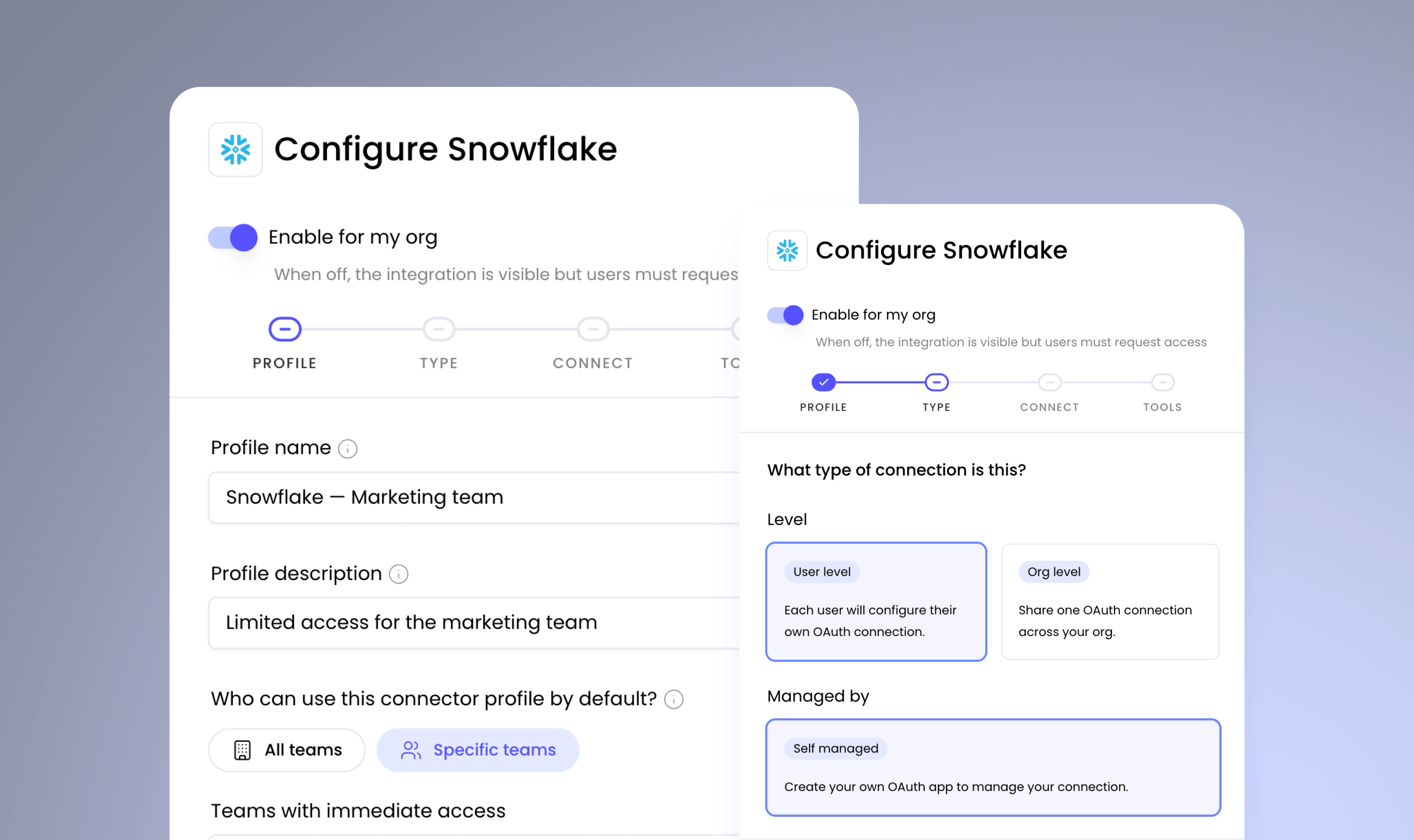
Connector Profiles fix that. Admins can set up multiple configurations of the same connector — different permissions, different scopes — and assign each profile to the team that should have it. Multiple Snowflake instances, multiple Databricks workspaces, multiple SharePoint sites, all from a single WRITER deployment. Different teams get different permissions on the same connector: some read-write, some read-only, some scoped to specific data domains.
The right WRITER Agent for each team: Agent Profiles
Different teams need different things from an AI teammate. Legal wants WRITER Agent with heavy guardrails and a specific set of Knowledge sources. Marketing wants the same agent with different capabilities turned on and access to the campaign Knowledge Graph. Most organizations solve this by either giving everyone the same overbroad capabilities or by spinning up separate, limited chatbots that never quite scale.
WRITER Agent Profiles let you deploy customized versions of WRITER Agent per team from a single management surface in AI Studio. You keep the full power of WRITER Agent while controlling which capabilities each profile exposes. Toggle features per team, customize display text, greetings, and disclaimers, pre-configure Knowledge Graphs, and set security controls, including public sharing. Everything is governed from one place.
Full visibility: AI Studio Observability and Datadog
Enterprises can’t trust agents they can’t see. Security teams need transparent, auditable activity. IT teams need usage and performance data to debug and understand adoption. And most enterprises already run oversight through a centralized observability platform — so logs that live only inside one vendor’s console create a gap.
We shipped both — a dedicated Observability module in AI Studio and a prebuilt Datadog Logs plugin that forwards every LLM event to the system your security and IT teams already use.
In AI Studio, every interaction with a custom agent now emits event metadata — request and response content, the model that handled it, tools called, guardrails applied, success/failure status, latency, and error details. The Datadog plugin takes that data and forwards it as a structured log event with full token usage, per-request cost, and the full prompt and completion content when available.
Bring your own encryption keys
Security-conscious enterprises in regulated industries have long had a specific ask — hold our own encryption keys. Until now, WRITER offered per-tenant encryption only for single-tenant customers — forcing a trade-off between data isolation and the scale benefits of multi-tenant.
Bring-Your-Own Encryption Key resolves that. Enterprise customers can adopt multi-tenant WRITER while holding their own keys from AWS, Azure, or GCP KMS — with full rotation, revocation, and audit control. Granular authority to encrypt, delete, and restrict access to data in WRITER, on a deployment that still delivers multi-tenant scale and cost.
Three things to try today
- Add an “Event ends” trigger to a recap Playbook. Connect Google Calendar, open your recap Playbook, and attach the trigger filtered to the meetings you want to recap. Send yourself a test invite, wrap it early, and watch the recap land in your inbox seconds later. For most people, this is the release’s “oh, I see it” moment.
- Set up a Gong “Call completed” trigger. Pick your best post-call workflow — CRM updates, action-item routing, debrief drafting — and attach the trigger. The next time a rep finishes a call, everything downstream runs before they’ve closed their laptop.
- Wire a Google Drive file trigger to brand review. Connect Drive, pick the folder your agencies drop into, and attach a New file trigger to a brand-review Playbook. Drop in a sample asset and watch the review kick off before anyone opens it.
Already a WRITER customer? Access these features now in your workspace
Ready to onboard WRITER Agent?
Our team specializes in AI program design, development, and adoption — we partner with you to turn early wins into an operating model that scales across your enterprise.
Ready to see what it looks like when your work triggers the work — across your stack, with IT in the driver’s seat?
Schedule a personalized demo where we’ll show you:
- Triggers that kick off Playbooks automatically from Gong, Google Calendar, SharePoint, and Google Drive
- End-to-end content supply chain automation from brief to published page in Adobe Experience Manager
- Per-team Connector Profiles and Agent Profiles that scale access safely
- Audit-ready Observability in AI Studio, natively integrated with Datadog
More resources
Innovation
– 17 min read
How WRITER Skills turn your team’s expertise into reusable AI capabilities

Marisa Almeida
AI agents at work
– 17 min read
How to build an AI-native marketing engine: The platform capabilities that make it possible

Diego Lomanto, CMO

Enterprise transformation
– 16 min read
Your next headcount is an AI Agent Owner: The new roles that define a successful agentic enterprise

Jevan Soo Lenox, Chief People Officer