
CONNECTORS

Put WRITER to work
across your tools

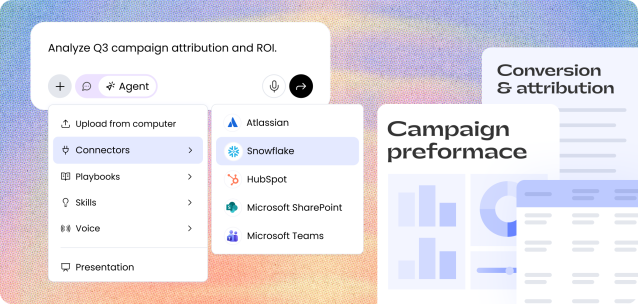
WRITER connects to your data and systems so agents can do the heavy lifting.
No more tool-hopping or lost context. Just end-to-end execution.
WHY CONNECTORS

Connect your stack. Automate the work.
One platform,
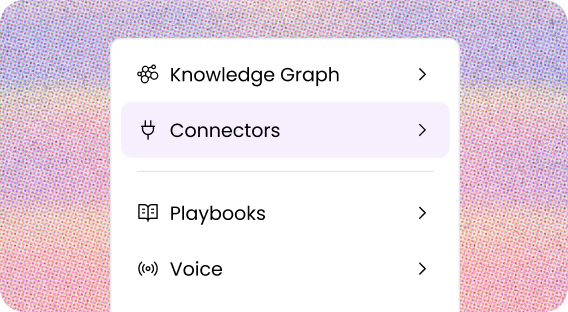
every building block

Connectors work alongside playbooks, skills, brand, and triggers so agents execute complete workflows — not just single tasks.

From prompted to proactive

Work doesn’t wait to be asked — it just runs. Execute tasks automatically across systems with event-based triggers.
The controls IT
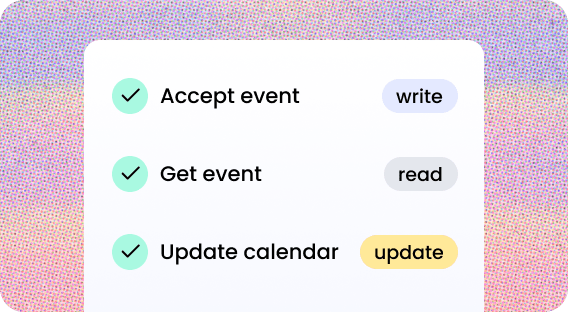
needs to say yes

Granular, tool-level permissions. Define policies once, enforce everywhere. Governance that enables rather than blocks.

CONNECTOR SHOWCASE

Connect WRITER to the tools your
teams use most

Featured

Semrush Logo Updated

Semrush

Pull keyword data, search volume, and SEO metrics to optimize content and improve search rankings.

SEO

Adobe logo

Adobe Experience Manager

Publish web pages, landing pages and product content directly from WRITER to eliminate manual data entry.

CMS

Atlassian
(Jira + Confluence)

Search documentation and manage tickets from WRITER to align marketing with product and engineering.

Work management

Asana

Access and update tasks, subtasks, and project details from WRITER to automate work creation and summaries.

Work management

Databricks

Access customer data and metrics in natural language — no SQL required — to power personalized campaigns and segmentation.

Data warehouse

FactSet

Access real-time market data, financials, and analytics to ensure accurate, up-to-date market commentary and reports.

Financial data

Gong

Pull call transcripts, summaries, and engagement data to give marketing sharper messaging and sales better account context.

CRM & sales intelligence
Google BigQuery logo

Google BigQuery

Access customer data and metrics in natural language — no SQL required — to power personalized campaigns and segmentation.

Data warehouse

Google Workspace

Connect WRITER and automate daily workflows across Google Workspace products: Gmail, Calendar, Docs, Sheets, Drive.

Collaboration

HubSpot

Read customer records, deal stages, and account history into WRITER to ground campaigns in real-time CRM data.

CRM & Sales intelligence

Microsoft 365

Connect WRITER and automate daily workflows across the Microsoft suite: Outlook, Calendar, Teams, OneDrive, SharePoint.

Collaboration

PitchBook

Pull private market data, valuations, and investor details to ground financial content and research in verified intelligence.

Financial data

Slack

Tap into conversations, summarize takeaways, and trigger messages to work where teams already communicate.

Collaboration

Snowflake

Access customer data and metrics in natural language — no SQL required — to power personalized campaigns and segmentation.

Data warehouse

Can’t find what you need?

Custom connectors let you bring any internal system or third-party
service into WRITER — with the same governance, permissions, 

and security as every native connector. 

Learn how

SECURITY & GOVERNANCE

Powerful enough for the business.
Safe enough for IT.

WRITER gives IT the controls to say yes to turning on connectors,
without the security risks that keep them up at night.

Secure, scoped access to every connected system

OAuth authentication scoped only to the objects IT approves. WRITER’s MCP gateway validates identity and blocks prompt injection on every request.

Give every team the right access — nothing more

Set up multiple configurations of the same connector — each with its own instance, permissions, and scope. Teams get only the access they need.

Full visibility into what agents are doing

Every connector interaction logged: which agent, which system, which action, when. Export to Splunk or Datadog. Full audit trail, no blind spots.

Compliance that covers regulated industries

SOC 2 Type II, ISO 27001/27701/42001, HIPAA, GDPR, CCPA, PCI.
WRITER doesn’t train on customer data. No security exceptions required.

Frequently Asked Questions

FAQs about connectors

What does MCP mean, and how does it affect the way WRITER connects to my tools?

MCP stands for Model Context Protocol — an emerging standard that defines how AI agents communicate with external tools and data sources. WRITER built its connector infrastructure on MCP, which means every connection goes through a purpose-built MCP gateway that validates identity, enforces permissions, and blocks prompt injection attacks before any request reaches your systems.

For marketing and business users, the practical effect is simple: your agents can act across your full tool stack — pulling customer data, pushing outputs to the right destination, triggering downstream workflows — without any manual data transfer or copy-pasting between systems. For IT, it means there’s a single, auditable layer of control for every tool action, rather than a patchwork of individual integrations to manage.

How long does it take to set up a WRITER connector, and how much IT involvement is required?

Native connectors are typically fast to activate — some customers have approved 20+ connectors in a single architecture review board meeting. WRITER’s “architecture-first approval” model means IT reviews and approves the overall MCP connector architecture once, then individual connectors can be rolled out incrementally without re-opening the security review each time.

For custom connectors, setup depends on the target system, but WRITER supports OAuth and API key auth out of the box and doesn’t require platform-specific development. The connector framework is designed to be lightweight enough that it doesn’t add significantly to your admin burden.

How do connectors work with WRITER agents and playbooks?

Connectors are what give WRITER agents the ability to act — not just generate text, but read data from your systems, take action, and push outputs to the right destination. When you build a playbook in WRITER, connectors give the agent access to the tools it needs at each step: pulling a customer record from Salesforce, checking brand compliance against your style guide, pushing a finished asset to your CMS, or logging a completed task in your work management tool.

Because connectors are part of the same platform as playbooks, skills, brand, and triggers, agents can execute complete end-to-end workflows without leaving WRITER or requiring manual handoffs. The result is consistent, on-brand, governed output across your martech stack — not just at the content creation step.

Does WRITER support custom connectors for internal or proprietary systems?

Yes. If a system isn’t in WRITER’s native connector library, you can build a custom connector for it. Custom connectors support OpenAPI spec (JSON or YAML) or MCP server configurations, API key or OAuth authentication at the user or org level, and granular read/write/update/delete permissions per tool operation.

Can WRITER respond to real-time events and triggers from connected systems, or does it only run on demand?

Both. WRITER supports event-driven workflows through triggers, which means an agent can be set to run automatically when something happens in a connected system — a new record in Salesforce, a Slack message matching certain criteria, a form submission, or a scheduled time. Connectors handle the two-way communication: reading the event data from the source system and pushing the output back to the right destination. This is what allows WRITER to power end-to-end automation pipelines, not just one-off content generation.

Can WRITER connectors be configured with granular, field-level access controls?

Yes. WRITER gives IT admins the ability to restrict access at the tool-action level — not just at the connector level. You can define which teams access which connectors, require per-user approval before a connector is turned on, and toggle read vs. read/write permissions individually per tool action. Nothing is open by default.

OAuth authentication is scoped only to the objects IT approves, and WRITER’s MCP gateway validates identity and blocks prompt injection on every request before it reaches your systems. Every connector interaction is logged — which agent, which system, which action, when — and can be exported to Splunk or Datadog.

Can I restrict a connector to a specific folder, team, or data subset rather than granting broad system access?

Yes. WRITER’s connector permissions are designed for exactly this kind of scoping. For cloud storage connectors like Google Drive or SharePoint, IT admins can restrict access to specific folders or drives rather than granting WRITER access to the entire system. At the team level, you can control which WRITER users or groups can access each connector, and require per-user approval before any individual can activate a connection. The goal is to give agents access to what they need — nothing more.

Put WRITER to work across your tools

Learn how you can power end-to-end workflows with WRITER connectors.

START MEASURING IN PIPELINE GAINED

Webinar | June 9th, 12 PM ET

Download the guide